
Approve in parallel, re-approve only what changed
Deal approvals for Salesforce teams whose quotes need Deal Desk, Finance, Legal, and Channel sign-off. Every path runs at once, a changed line re-routes only the approvers it affects, and reps ask where it stands without leaving the conversation.
Q-1042 · Acme renewal
Rep changed one line: Discount 18% → 20%
- Deal DeskDiscount over 15%Re-approving
- FinanceMulti-year price lockApproved
- LegalNon-standard termsApproved, stands
- ChannelPartner pricingPending
- One chain
- waits on the sum of every path
- Matrix
- waits on the longest single path
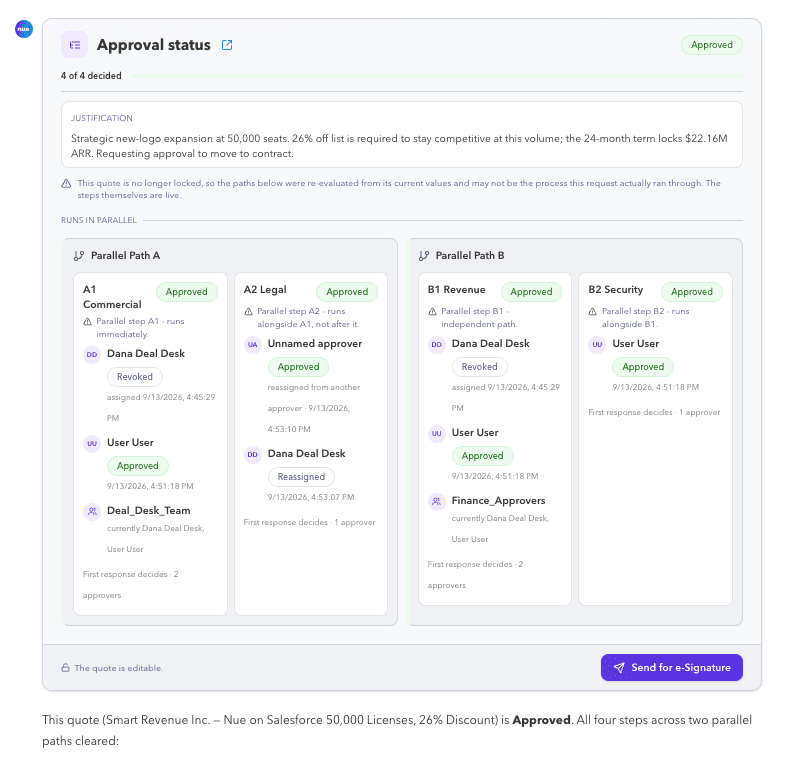
Conversational status
“Where’s my approval?”
Today the rep knows the deal is somewhere and asks Deal Desk where. With Approved, reps and AI agents ask in plain language and get the answer from the approval itself, without leaving the conversation or RevOps writing code.
- Answered by the approval, not a personEvery path, every step and every approver: what’s approved, what’s waiting, who decided and when.
- The same rules for agent-made changesA renewal or amendment an AI agent creates runs through the same matrix as a rep’s quote, so Finance can let an agent touch it.
- Through APIs and the Nue MCP ServerStatus reaches the chat, the CRM and the agent from one source, with the deal’s justification attached.
A rep asks: Where’s the approval on the Acme renewal?
One hundred ways to approve
Every approval your business runs, on one engine
One hundred approvals real revenue teams run, from a discount threshold to a credit memo. Filter by team or by capability. 64 of them can’t be built with classic Salesforce approvals, and 11 need a capability Salesforce CPQ Advanced Approvals lacks.
- approval scenarios
- 100
- beyond classic Salesforce approvals
- 64
- need a capability CPQ Advanced Approvals lacks
- 11
- Sales#001
Any line discounted more than 15%
- Sales manager
- RevOps
- Multiple approval steps
- Multi-line approval criteria logic
- Sales#002
Total discount above 30%
- Sales manager + RevOps + CRO · in parallel
- Parallel approval paths
- Multi-line approval criteria logic
Beyond classic approvals
- Sales#003
New business over $250K ARR
- CRO + CFO · in parallel
- Parallel approval paths
Beyond classic approvals
- Sales#004
Multi-year deal with a price lock on every line
- Deal desk
- Finance
- Multiple approval steps
- Triggers on related data
Beyond classic approvals
- Sales#005
Ramp deal with a deeper discount in year one
- Deal desk
- Triggers on related data
Beyond classic approvals
- Sales#006
Free months added to the subscription term
- Sales manager
- Finance
- Multiple approval steps
- Sales#007
Payment terms longer than net 30
- Finance
- Multi-line approval criteria logic
- Sales#008
Monthly or quarterly billing instead of annual upfront
- Billing
- Multi-line approval criteria logic
- Sales#009
A product line priced below its floor
- Product line owner
- Matrix-based approvals
- Triggers on related data
Beyond Advanced Approvals
- Sales#010
A bundle broken apart on the quote
- Product manager
- Triggers on related data
Beyond classic approvals
- Sales#011
Competitive takeout pricing
- Sales VP
- CRO
- Multiple approval steps
- Sales#012
Early renewal with a price hold
- CS lead
- Finance
- Multiple approval steps
Comparison
How Approved compares with Salesforce’s approvals
Salesforce now runs approval paths in parallel. It does not run them as a matrix, and its classic and Flow approvals re-approve the whole chain when the deal changes.
| Capability | Classic Salesforce | Flow Approval Processes | CPQ Advanced Approvals | Approved |
|---|---|---|---|---|
| Matrix-based paths across three to five dimensions | Classic Salesforce: no | Flow Approval Processes: no | CPQ Advanced Approvals: no | Approved: yes |
| Change-aware re-approval per path | Classic Salesforce: no | Flow Approval Processes: no | On resubmit, skips steps already approved | Approved: yes |
| Reusable approval paths across objects | Classic Salesforce: no | Flow Approval Processes: no | CPQ Advanced Approvals: no | Approved: yes |
| Rule-based delegation and a graphical status page | Classic Salesforce: no | Approval Trace only | Scheduled delegation | Approved: yes |
| Conversational status through APIs and MCP, with the same rules for agent-made changes | Classic Salesforce: no | Flow Approval Processes: no | Preview APIs only | Approved: yes |
| Parallel paths | Classic Salesforce: no | Flow Approval Processes: yes | CPQ Advanced Approvals: yes | Approved: yes |
| Approvals on any object | Limited | Flow Approval Processes: yes | Yes, with configuration | Approved: yes |
Free consultation
Struggling with approvals in Salesforce? Let’s fix it in 30 minutes.
Get a free 1:1 consultation with a Salesforce approvals expert.
What you’ll walk away with
- A quick audit of your current approval process
- Recommendations tailored to your Salesforce environment
- How to reduce deal friction without building custom flows
Configure and track
Paths you set up with clicks. Status every approver can see.
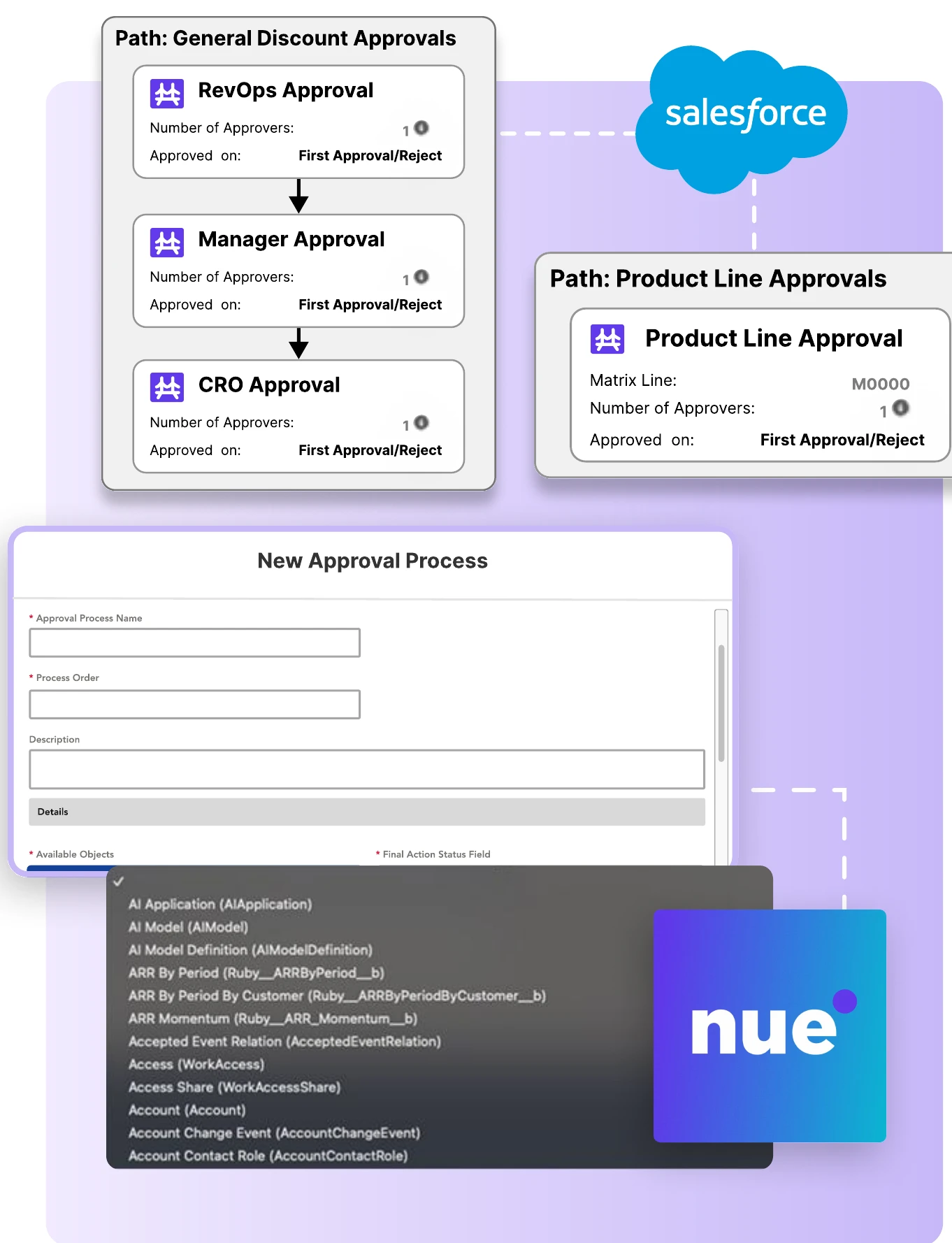
Every path at once
Discount, Finance, Legal and Channel approvals run as a matrix, so approval time is the longest single path, not the sum of all of them.
Re-approve only what changed
A discount edit goes back to Deal Desk. Legal’s approval stands, and Legal doesn’t read the contract again.
Reusable paths, set up with clicks
One path set, maintained in a configurator, replaces custom Apex and one approval process per object.
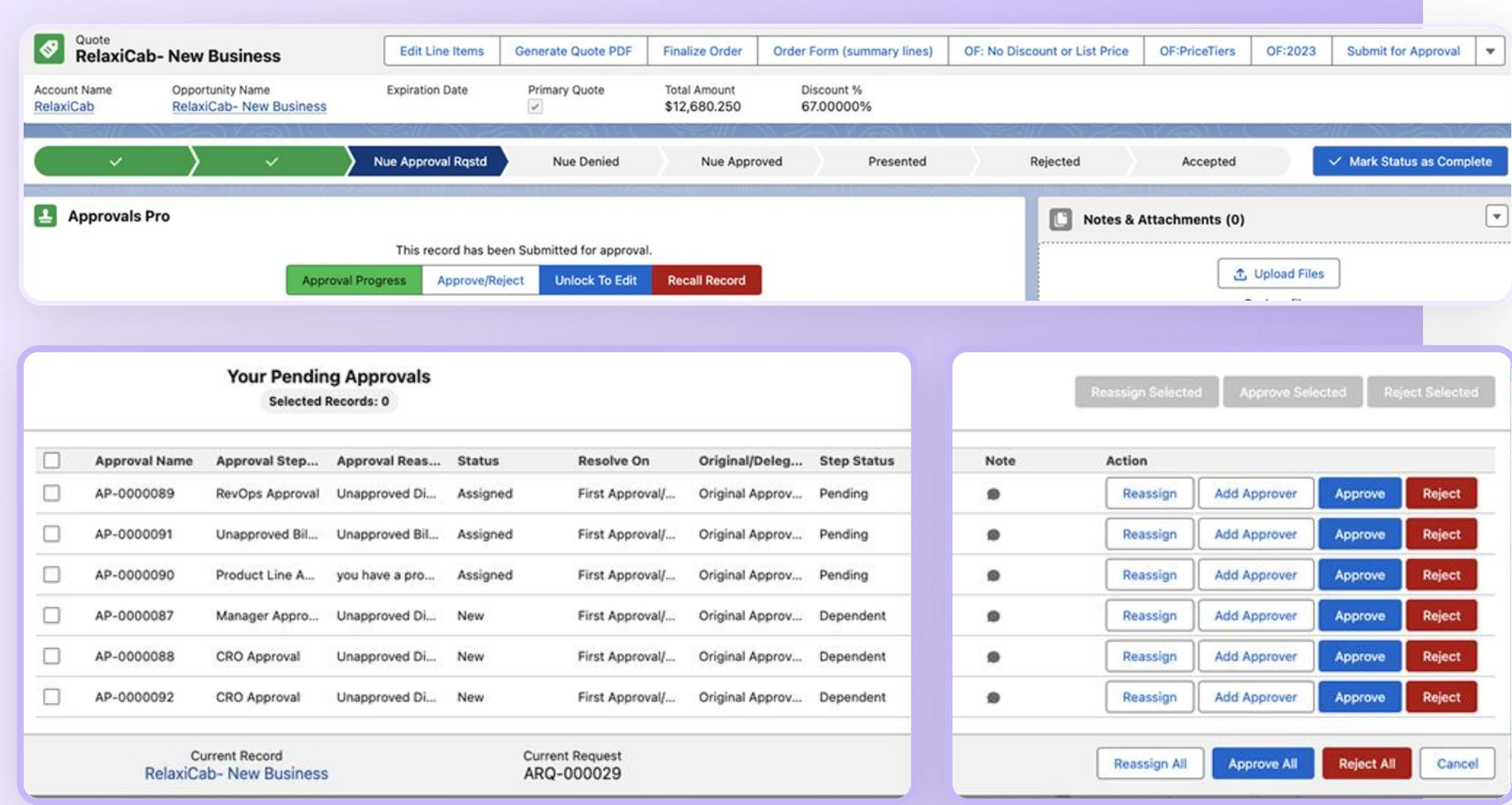
A status page on every record
Every approver and every step in one view. Approve, reassign and recall from the record, and clear a queue in bulk.
An audit trail for every decision
Who approved, rejected or delegated, and when, logged in Salesforce and ready for SOX review and reporting.
Native to Salesforce
Runs on any standard or custom object your org uses, from quotes and contracts to credit memos.
Hear from our users
“Our approval strategy is complex and historically solutioned with heavy code and configuration. We implemented [Approved] in a few months and took all of the custom code out of our CRM and built it through declarative tools in [Approved].”
 Drew HolmanExecutive Director of Enterprise Applications, Black Duck
“The standard Salesforce approvals were not sufficient for our complex B2B approval processes, so we looked for an affordable alternative. [Approved] improved the transparency of our process: approvers have an extra level of insight during the approval process.”
 Laurens UbertVodafone
“Throughout the whole setup process, we had excellent customer service. The response times have been excellent. The product, once integrated, has sped up our approval process greatly, and has saved a lot of time and headaches.”
 Theresa RequateFinancial Analyst, TELUS Business
Value by function
What changes, function by function
Sales and Deal Desk
Approval time becomes the longest single path instead of the sum of all paths.
Matrix and parallel paths
Legal and Finance
A deal that changes mid-approval loses a step, never the whole cycle. Legal stops re-reading contracts because a discount moved.
Change-aware re-approval
RevOps and Salesforce admins
One path set maintained with clicks replaces custom code and one approval process per object.
Reusable paths and rule-based delegation
Sales and Deal Desk
The rep stops chasing, and Deal Desk stops answering status pings.
Conversational status
Finance
An AI agent can touch a renewal, because the matrix runs on it exactly as it runs on a rep’s quote.
The same rules for agent-made changes
FAQ
Frequently asked questions
What is Approved, and how does it work?
- Approved is deal approvals for Salesforce teams whose quotes need sign-off from more than one function. Discount, Finance, Legal, and Channel approvals run as a matrix, every path at once, and when the deal changes only the approvers that change affects see it again. Reps and AI agents ask where an approval stands in plain language and get the answer from the approval itself, without the rep leaving the conversation or RevOps writing code. It is available standalone or integrated with Nue CPQ and Billing.
How does Approved integrate with my existing tools?
- Approved is 100% Salesforce-native and works with any Salesforce-based object model. It integrates with ERP and finance systems, and an API allows custom integrations, so it fits your existing workflow without disrupting operations.
Which Salesforce objects can Approved approve?
- Any of them. Approved runs on any standard or custom object in Salesforce, not only quotes and opportunities: contracts, orders, credit memos, refunds, price book changes and objects your org built, all on the same approval engine, rules and audit trail.
Can Approved approve changes made by AI agents or other applications?
- Yes. Approved governs the record, not the screen it was edited in, so the same approval rules apply whether a change comes from a rep, from an agentic transaction such as a renewal or amendment created by Nue AI, from Nue itself, or from another application or integration writing to Salesforce. Automated changes get the same approvals, delegation and audit trail as manual ones.
Can Approved be customized for different approval workflows?
- Yes. Set up multi-step approval processes, define user roles and permissions, and create conditional logic to automate decisions. Configure parallel and matrix approvals, and run multiple approval processes on the same record at once, from one-step approvals to complex, multi-tiered workflows.
How does Approved enhance compliance and security?
- Approved keeps a transparent audit trail of every approval, including timestamps, decision-makers and supporting documents. It enforces role-based access control (RBAC) and works with single sign-on (SSO) and multi-factor authentication (MFA).
What is Nue?
- Nue is an end-to-end revenue lifecycle platform that replaces legacy CPQ and billing systems, so B2B companies can price, quote, sell, bill and recognize revenue across every channel with greater speed, flexibility and accuracy.

Approve in parallel. Re-approve only what changed.
Run every approval path at once, re-approve only what changed, and see where every deal stands.
Standalone or integrated with Nue CPQ and Billing.